Last updated: March 2026
You just wrapped a safety meeting with your crew. Fifteen people heard the talk, asked questions, and headed to their stations. But you have no record of it. No sign-in sheet, no agenda, no minutes. When the COR auditor asks for documentation of your safety meetings next quarter, you will be scrambling to recreate something from memory. This is the most common gap we see when working with contractors across Canada: the meeting happens, but the paper trail does not.
The fix is not complicated. It is just having the right templates ready before the meeting starts. Below, we have put together a set of free, downloadable safety meeting templates that cover the most common formats you will need.
Quick Answer
- What you get: Free templates for safety meeting minutes, agendas, sign-in sheets, and report forms
- Formats: Tips for building your own in Word, PDF, or digital formats
- Who needs these: Safety coordinators, supervisors, and contractors who need to document safety meetings for COR/SECOR audits, provincial compliance, or OSHA recordkeeping
- Digital option: Safety Evolution's platform lets you run meetings, capture attendance, and store records digitally
Those are the basics, but the real challenge is building templates that your supervisors will actually fill out consistently. Below, we walk through each template type with specific guidance on what to include, common mistakes to avoid, and how to set up documentation that survives a COR audit without creating extra paperwork your team will ignore.
Why Safety Meeting Documentation Matters
Safety meeting documentation is the written record of what was discussed, who attended, and what actions were agreed upon during a workplace safety meeting. It sounds like busywork, but it serves three critical purposes that most contractors underestimate until audit season hits.
Want the complete meeting framework? Use the templates below as your core documentation system for agendas, minutes, attendance, and follow-up actions.
First, it is evidence that your safety program is active. COR and SECOR auditors do not just check that you have a safety policy binder on a shelf. They want to see proof that your workers are actually participating in regular safety discussions. Meeting minutes, sign-in sheets, and action item logs are the artifacts that prove it.
Second, documentation protects you after an incident. If a worker gets hurt doing something that was covered in last Tuesday's toolbox talk, your sign-in sheet showing they attended that meeting is a significant piece of your due diligence defense.
Third, it creates institutional memory. When your best supervisor leaves and a new one takes over, those meeting records tell them what has been covered, what issues are recurring, and where the crew needs more training.
Most contractors we work with are not anti-documentation. They just do not have a system. A single-page template solves 80% of the problem.
What Should a Safety Meeting Agenda Include?
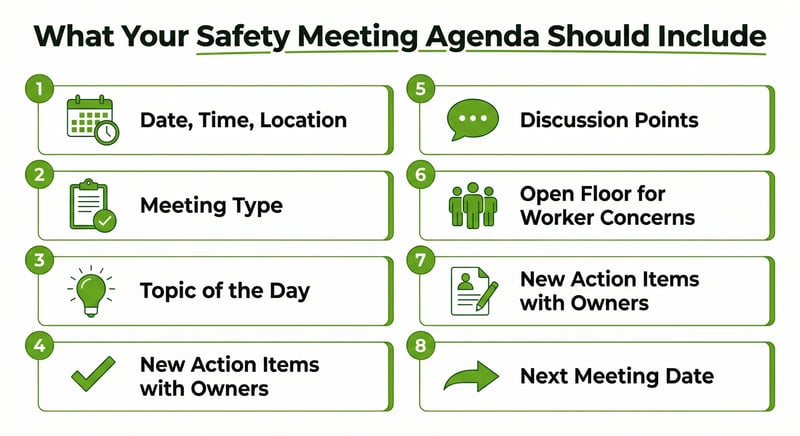
A safety meeting agenda keeps your meeting focused and prevents it from turning into a 45-minute ramble. Here is what a solid agenda template should include:
- Date, time, and location
- Meeting type (toolbox talk, weekly safety meeting, JHSC meeting, project kick-off)
- Topic of the day with a brief description
- Review of previous action items
- Discussion points (2 to 3 maximum for a toolbox talk, 4 to 6 for a formal meeting)
- Open floor for worker concerns and hazard reports
- New action items with assigned owners and due dates
- Next meeting date
Keep the format to one page. If your agenda is longer than one page, your meeting is probably too long. For daily toolbox talks, a half-page format works even better.
Need topics to fill your agenda? Check our safety meeting topics guide list for ideas organised by industry and season.
Safety Meeting Minutes Template
Meeting minutes capture what happened during the meeting. They are not a transcript. They are a concise record of key discussion points, decisions, and action items. A good minutes template includes:
- Meeting header: Date, time, location, facilitator name
- Attendees: List of all participants (or attach a separate sign-in sheet)
- Topics discussed: Brief summary of each topic covered
- Key points raised: Worker questions, concerns, or observations worth recording
- Decisions made: Any agreements or policy clarifications
- Action items: Specific tasks, who is responsible, and target completion dates
- Follow-up from previous meeting: Status of previously assigned action items
- Facilitator signature and date
The biggest mistake with minutes templates is making them too detailed. Your supervisor should be able to complete the form in under 5 minutes after the meeting. If it takes longer, they will stop filling it out.
Safety Meeting Sign-In Sheet Template
The sign-in sheet is the simplest template but arguably the most important. It proves who was in the room. During a COR audit or an incident investigation, the auditor or investigator will want to know exactly who was informed about a specific hazard or procedure.
A basic sign-in sheet needs:
- Company name and project/site name
- Date and meeting topic
- Facilitator name
- Table with columns for: Printed name, company/employer (important for multi-employer sites), signature, and employee ID or badge number
- Space for notes or follow-up actions at the bottom
On multi-employer construction sites, including the employer column is critical. The prime contractor needs to demonstrate that workers from all subcontractors participated, not just their own crew.
If you manage multiple sites, digital sign-in through a mobile safety app eliminates the paper shuffle and makes records instantly searchable when audit time comes.
Still Filing Meeting Records Manually and Chasing Signatures?
You can keep doing this paperwork by hand, filing records, and tracking down missing signatures before every audit. Or you can run meetings in Safety Evolution for 30 days and see how much easier documentation gets.
Start Your 30-Day Free Trial
Safety Meeting Report Template
A report template is used for more formal safety meetings, particularly JHSC (Joint Health and Safety Committee) meetings where you need to document recommendations, track corrective actions, and report outcomes to management.
The report template should include everything in the minutes template plus:
- Incident review section: Summary of any incidents, near misses, or hazard reports since last meeting
- Inspection findings: Summary of workplace inspections completed
- Corrective action tracker: Table showing each action item, status (open/closed), responsible person, and target date
- Recommendations to management: Formal recommendations from the committee with response timelines
- Training completed: Any training delivered since the last meeting
- Next meeting date and agenda preview
This format is especially useful for companies pursuing or maintaining COR certification where audit protocols require evidence of committee activities and management response to recommendations.
Toolbox Talk Form Template
The toolbox talk form is the stripped-down version for daily or weekly short talks. It should fit on a single page and take less than 2 minutes to complete after the talk:
- Date and project/site
- Topic title
- Key points covered (3 to 5 bullet points)
- Hazards identified
- PPE required for today's work
- Attendee signatures
- Facilitator signature
Already have your own form but need better topics? Our free toolbox talk package includes 50+ ready-to-deliver talks designed for construction sites.
Tips for Building Your Own Templates
If you are creating custom templates for your company, keep these principles in mind:
- One page maximum for field documents. Your supervisor is filling this out on a clipboard in the rain. Make it simple.
- Include your company logo and branding. It looks professional during audits and signals that safety is part of your company identity.
- Use checkboxes where possible. Checkboxes are faster than fill-in blanks and reduce inconsistent entries.
- Leave space for action items. Every template should have room for "what are we going to do about it?" A meeting without action items is just a conversation.
- Version control. Put a revision date in the footer. Auditors like seeing that your templates evolve as your program matures.
Canadian Provincial Documentation Standards
Template design is not just about convenience. Different provinces and certifying partners have slightly different expectations for what safety meeting documentation should contain.
In Alberta, the ACSA (Alberta Construction Safety Association) COR audit protocol evaluates whether your meeting records demonstrate worker participation, relevant topic selection tied to site hazards, and documented follow-up on action items. Your templates need to capture all three. A template that only records the topic and attendance list will score poorly because it does not show whether workers actually contributed to the discussion or whether anything changed as a result.
In British Columbia, WorkSafeBC expects JHSC meeting minutes to include not just what was discussed, but specifically what recommendations were made to the employer and what the employer's response was. Section 3.26 of the OHS Regulation also requires a written annual evaluation of JHSC effectiveness. If your JHSC meeting template does not have a dedicated section for recommendations and employer responses, add one now. Auditors check for it.
In Ontario, the OHSA requires that JHSC meeting minutes be recorded and maintained. The minutes must include the names of all members present, the issues raised, and the recommendations made. Ontario construction projects under O. Reg. 213/91 have additional requirements for multi-employer worksites where the constructor is responsible for coordinating safety across subcontractors.
In Saskatchewan, OHS Committees must keep minutes of each meeting and make them available to workers and the ministry upon request. Templates should include a distribution line showing how minutes were shared with the broader workforce, not just the committee members.
Regardless of your province, here is a practical rule: design your templates so the output matches your audit scoring criteria. Pull a copy of your certifying partner's audit protocol (ACSA, BCCSA, IHSA, or SCSA) and check which elements they evaluate for safety meetings. Build your template to capture those exact elements. It takes 30 minutes to cross-reference, and it can mean the difference between scoring 70% and 90% on the communication section of your audit.
If you are not sure which certifying partner you fall under or what their specific documentation expectations are, you can keep checking this manually across binders and spreadsheets, or start a 30-Day Free Trial to benchmark your records and spot compliance gaps before your next audit.
US Documentation Standards: OSHA and State Requirements
If you operate in the United States, your documentation needs are shaped by OSHA and, in some cases, state-plan state requirements. The good news: OSHA does not prescribe a specific template format for safety meetings. The bad news: that lack of specificity means many contractors under-document and regret it during an inspection.
Federal OSHA does not require safety meetings for most industries. But documentation still matters for three reasons:
- OSHA 1910.157(g) and similar training standards require proof that workers were trained on specific topics (fire extinguishers, hazard communication, lockout/tagout). Safety meeting sign-in sheets serve as that proof.
- OSHA citations and willful violations carry significantly higher penalties if you cannot demonstrate that workers were informed of known hazards. Meeting documentation is your defense.
- ISNetworld, Avetta, and Veriforce prequalification platforms often ask for evidence of regular safety meetings as part of contractor evaluation. No documentation, no score.
State-Plan States with Meeting Requirements
At least 14 state-plan states mandate safety meetings or safety committees. Your templates need to reflect the specific requirements of your state:
- California (Cal/OSHA): Construction employers must hold tailgate safety meetings at least every 10 working days (Title 8, Section 1509). Templates need to capture the specific Cal/OSHA elements: date, topic, attendee signatures, and supervisor conducting the meeting.
- Washington (DOSH): Employers with 11+ workers must have a safety committee that meets monthly. Minutes must be maintained for at least 1 year (WAC 296-800-13020).
- Oregon (OR-OSHA): Safety committees are required for all employers with 11+ workers. Monthly meetings with documented minutes are mandatory (OAR 437-001-0765).
- Minnesota (MNOSHA): Joint labor-management safety committees are required for employers with 25+ employees in certain industries (Minn. Stat. 182.676).
If you work across multiple states, build your templates to meet the most demanding state requirement. A template that satisfies Cal/OSHA's tailgate meeting rules will also satisfy less prescriptive states.
What US Templates Should Include
At minimum, US safety meeting templates should capture:
- Company name, site location, and date
- Topic and applicable OSHA standard (e.g., "Fall Protection per 29 CFR 1926.501")
- Facilitator name and title
- Attendee signatures (or digital equivalent)
- Key discussion points and worker questions
- Action items with owners and deadlines
Including the applicable OSHA standard number on your template is a small addition that pays off during inspections. It shows the inspector that your meetings are tied to specific regulatory requirements, not generic filler.
You can keep running this on paper and manually pulling proof for every inspection, or start a 30-Day Free Trial to centralise meeting records, signatures, and corrective actions in one searchable system.
Going Digital: When Paper Is Not Enough
Paper templates work. They have worked for decades. But if you are running multiple sites, managing 30+ workers, or getting ready for a COR audit, the administrative overhead of paper starts to drag.
Common paper problems:
- Forms get lost between the site trailer and the office
- Handwriting is illegible
- Sign-in sheets from six months ago are buried in a filing cabinet nobody can find
- No easy way to search for a specific meeting by topic or date
Digital safety platforms solve these problems by letting your supervisors run meetings on a tablet or phone, capture electronic signatures, and store everything in a searchable database. When the auditor asks "show me all safety meetings from Q3 where you discussed fall protection," you can pull that up in seconds instead of digging through binders.
Safety Evolution's digital forms platform lets you build custom meeting templates, capture attendance with electronic signatures, and generate reports automatically. It is the same system we use with our managed clients.
Use the Templates, Then Let the System Run the Process
These forms are a strong start, but audits are won with consistent execution. Try Safety Evolution free for 30 days to digitise meetings, signatures, action items, and audit-ready records in one searchable place.
Start Your 30-Day Free Trial
Frequently Asked Questions
What format should safety meeting templates be in?
Word (.docx) is best for templates you want to customise. PDF works for standardised forms that should not be altered. For field use, digital templates on a mobile app are the most practical because they eliminate paper handling and make records searchable.
Do I need different templates for toolbox talks and formal safety meetings?
Yes. Toolbox talks use a simplified one-page form covering the topic, key points, and attendance. Formal safety meetings (especially JHSC meetings) need a more detailed template with sections for incident review, corrective actions, and recommendations to management.
How long should I keep safety meeting records?
Keep safety meeting records for a minimum of 3 years. Many provincial regulations and COR audit protocols require records to be available for at least the current and previous audit cycle. Some companies keep records for 5+ years as a best practice, especially for JHSC meeting minutes.
What safety meeting records do COR auditors look for?
COR auditors typically look for: evidence of regular safety meetings (frequency varies by certifying partner), attendance records with signatures, documentation of topics covered, action items and follow-up, and evidence that meetings are tailored to current work activities rather than generic filler topics.
Can I use safety meeting templates from the US for Canadian workplaces?
US templates (like OSHA-formatted forms) can work as a starting point, but they will not reference Canadian legislation, provincial requirements, or Canadian terminology (JHSC, WHMIS, COR). It is better to use Canadian-specific templates or modify US templates to reflect your provincial requirements.
What documentation does OSHA require for safety meetings?
Federal OSHA does not mandate safety meetings for most industries and does not prescribe a specific template. However, many OSHA training standards (hazard communication, lockout/tagout, fall protection) require proof that workers were trained. Safety meeting sign-in sheets with attendee signatures and topic details serve as that proof during inspections. State-plan states like California, Washington, and Oregon have additional meeting and documentation requirements.
Do ISNetworld and Avetta require safety meeting documentation?
Yes. ISNetworld, Avetta, and Veriforce contractor prequalification platforms include safety meeting frequency and documentation as scoring criteria. Contractors who can show consistent, documented safety meetings with signed attendance records score higher on safety management evaluations. Many operators require minimum scores to bid on projects.
Get Weekly Safety Insights
Regulation updates, toolbox talk ideas, and compliance tips. One email per week.