Last updated: March 2026
Your crew is filing WCB claims for sore backs and repetitive strain, your incident reports keep flagging "manual handling" as the cause, and your safety coordinator just told you that ergonomics came up during your last COR audit. You know you need to do something. But where do you start when "ergonomics" sounds like something from an office furniture catalog, not a construction site?
At Safety Evolution, we help contractors build safety programs that pass audits and actually protect people. Ergonomics comes up in almost every safety management system we develop, and most contractors underestimate how much it matters until the WCB claims start stacking up.
⚡ Quick Answer
- What: An ergonomics program is a systematic, ongoing process for identifying and controlling musculoskeletal injury (MSI) risks in your workplace
- Why: MSIs are the #1 workplace injury in Canada, costing billions in WCB claims annually
- Components: Management commitment, hazard ID, risk assessment, controls, training, incident reporting, program evaluation
- COR connection: Ergonomics feeds directly into COR audit elements for hazard assessment, training, and incident investigation
- Timeline: A basic program can be operational in 60 to 90 days; maturity takes 6 to 12 months
- Free Resource: Download our Construction Health & Safety Manual.
An ergonomics program is a structured, ongoing effort to identify and control ergonomic hazards across your workplace. For Canadian employers building or maintaining a Safety Management System (SMS), ergonomics isn't a standalone initiative: it integrates directly into your hazard identification, risk assessment, training, and continuous improvement processes.
This guide shows you how to build an ergonomics program that fits into your existing SMS framework and satisfies COR audit requirements.
What Is an Ergonomics Program and Why Does Your SMS Need One?
An ergonomics program is a structured, ongoing process within your safety management system that identifies, assesses, and controls workplace risk factors that cause musculoskeletal injuries. It is not a one-time assessment. It is not a poster on the wall. It is a continuous cycle built into how your company operates every day.
Here is why that matters: musculoskeletal injuries are the leading type of workplace injury across Canada. In British Columbia alone, MSI claim costs exceeded $2.35 billion over a five-year period according to WorkSafeBC data. In Nova Scotia, over 63% of all workplace injuries in 2023 were MSIs. These are not fringe statistics. Your crew is lifting, pulling, hammering, and holding awkward positions every single shift.
Most contractors think ergonomics is an office problem. Sit-stand desks and keyboard trays. They are wrong. On a construction site, ergonomic risk factors include manual material handling, repetitive tool use, awkward postures in confined spaces, whole-body vibration from heavy equipment, and sustained overhead work. These are the things that end careers, not just cause sore muscles.
If you are not sure where your current program stands on ergonomics, and show you where ergonomic gaps exist in your program.
If you already have a health and safety management system in place, an ergonomics program does not sit beside it. It plugs directly into it. Your hazard assessment process should already be identifying ergonomic hazards. Your training program should already be covering proper techniques. Your incident reporting should already be capturing MSI-related events. An ergonomics program simply makes these connections intentional and systematic, rather than accidental.
And if you are pursuing or maintaining COR certification, you need to know: auditors will look for evidence that you are identifying and controlling ergonomic hazards. It is not a separate audit element, but it runs through several of them.
Need a Complete Safety Program?
Stop starting from scratch. Download our Free Construction Health & Safety Manual to get compliant fast.
Download the Free Manual →
What Are the 7 Components of an Effective Ergonomics Program?
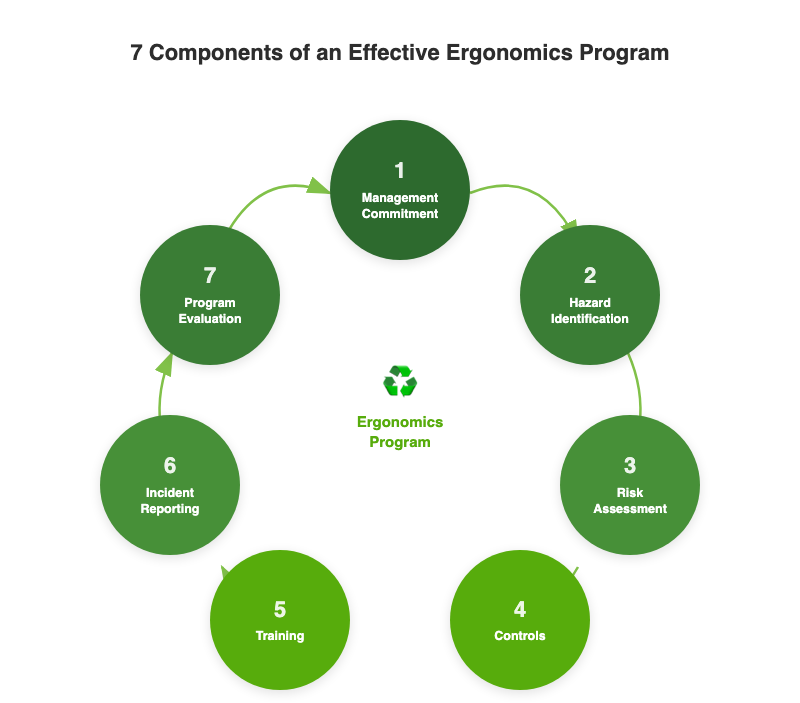
An ergonomics program in the workplace has seven core components. Skip any one of them and the program will eventually collapse. Here is what each involves and what it actually looks like on a job site.
1. Management Commitment and Policy
This is where most programs either get real traction or die quietly. Management commitment means the owner or GM has signed off on an ergonomics policy, allocated budget for controls, and visibly supports the program. Not just a signature on a document. Visible support: attending ergonomics training, asking about MSI trends in safety meetings, approving equipment purchases when a hazard is identified.
Your ergonomics policy does not need to be a 10-page document. A clear one-page statement that says your company commits to identifying and reducing MSI risks, that resources will be provided, and that workers are expected to report ergonomic hazards is enough to start. Make sure it references your existing OHS policy so auditors can see the connection.
2. Hazard Identification
This is the foundation. You cannot control what you have not identified. For ergonomics, hazard identification means looking at every task your crew performs and asking: does this involve forceful exertion, awkward postures, repetitive motion, contact stress, or vibration?
In Alberta, field-level hazard assessments (FLHAs) should already capture these. But most FLHA forms focus on falls, electrical, and struck-by hazards. If your FLHA template does not have a line item for ergonomic risk factors, add one. It is that simple.
In BC, WorkSafeBC's OHS Regulation Part 4 (Sections 4.46 to 4.53) specifically requires employers to identify factors that may expose workers to MSI risk. This is not optional guidance. It is a regulatory requirement.
3. Risk Assessment
Once you have identified the hazards, you assess the risk. Not every awkward posture is equal. Risk assessment for ergonomics considers three factors: the magnitude of exposure (how much force or how extreme the posture), the frequency (how often the worker does it), and the duration (how long each exposure lasts).
A worker who lifts a 20 kg bag once in the morning is a different risk profile than a worker who lifts 20 kg bags 200 times per shift. Both are "manual handling." Only one is likely to generate a WCB claim.
You do not need a PhD in biomechanics to do this. Simple tools like the NIOSH Lifting Equation (a reference tool, not a Canadian requirement) or even a basic risk matrix that rates frequency, force, and duration can get you started. What matters is that you have a documented process showing you assessed the risk, not just identified it.
4. Controls
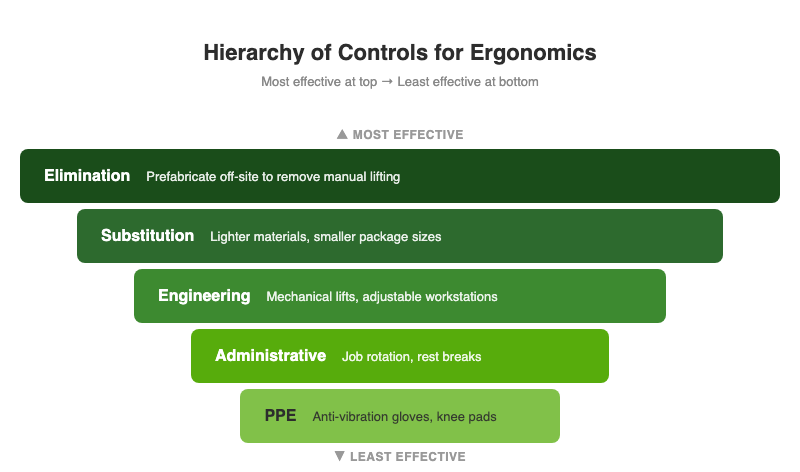
Controls follow the standard hierarchy: eliminate, substitute, engineer, administer, PPE. For ergonomics, this looks like:
- Elimination: Can you remove the task entirely? Prefabricate components off-site so workers are not lifting heavy materials at height.
- Substitution: Can you change the material or method? Lighter materials, smaller package sizes, powered equipment instead of manual handling.
- Engineering controls: Adjustable workstations, mechanical lifts, anti-vibration tool handles, ergonomic hand tools. These are the controls that actually work long-term because they do not depend on worker behaviour.
- Administrative controls: Job rotation, scheduled rest breaks, task variation, proper lifting training. These reduce exposure but depend on compliance.
- PPE: Anti-vibration gloves, knee pads, wrist supports. Last resort. PPE does not fix the hazard; it just reduces the impact.
Here is the blunt truth: most contractors skip straight to administrative controls and PPE because they are cheap. "We told them how to lift properly" is not a control. It is a liability. When the auditor asks what engineering controls you have considered and you have nothing, that is a gap. When a worker files a WCB claim for a back injury and your only "control" was a training video, you are exposed.
5. Training and Education
Training is where your ergonomics program connects to your existing training program. Every worker needs to understand the basics: what MSI risk factors look like, how to report ergonomic concerns, and what controls are in place for their specific tasks.
In Alberta, the OHS Code requires employers to ensure workers are trained in the hazards of their work and the controls in place. In BC, Section 4.51 of the OHS Regulation explicitly requires ergonomics education and training that covers identifying MSI risk factors, the early signs and symptoms of MSIs, and the procedures for reporting them.
Practically, this means three things:
- Orientation: New workers learn about ergonomic hazards specific to their role during onboarding
- Task-specific training: Workers learn proper techniques and available controls for their actual tasks, not generic "lift with your legs" content
- Refresher training: At least annually, or when tasks change, new equipment is introduced, or an MSI incident occurs
A five-minute toolbox talk on ergonomics before a shift where workers will be doing heavy lifting is worth more than a two-hour classroom session they sat through six months ago. Make it relevant, make it short, and make it specific to the day's work.
6. Incident Reporting and Investigation
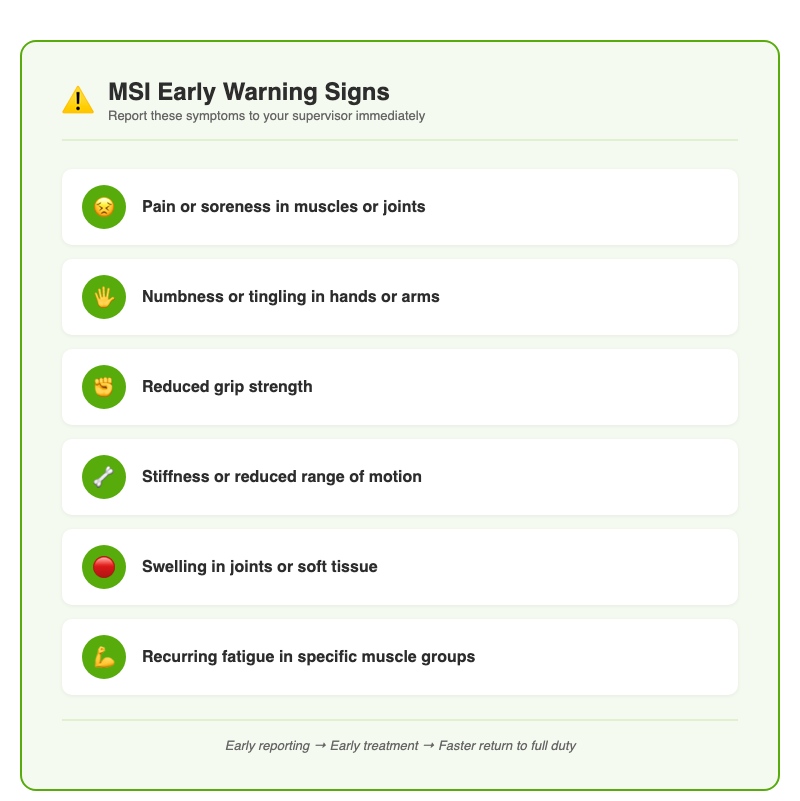
When an MSI happens, or when a worker reports early symptoms like soreness, numbness, or reduced grip strength, your incident reporting system needs to capture it. This is where many contractors drop the ball. Back pain gets treated as a personal problem, not a workplace hazard.
Your incident investigation process should include ergonomic root cause analysis. When a worker reports a back strain, the investigation should not stop at "worker lifted incorrectly." It should ask: what was the weight? How many times did they lift it? Was mechanical assistance available? Was the work area set up so they could use neutral postures? Was the task designed for one person or two?
Track MSI data as a leading indicator. If you are seeing a spike in soft tissue complaints from one crew or one task, that is your early warning system. Address it before it becomes a lost-time claim.
7. Program Evaluation
An ergonomics program that never gets reviewed is a program that quietly becomes irrelevant. Schedule a formal review at least annually. In BC, WorkSafeBC requires employers to monitor the effectiveness of their MSI controls and review them at least once per year under Section 4.52 of the OHS Regulation.
Your annual review should look at:
- MSI incident trends: are they going up, down, or flat?
- Hazard reports: are workers identifying new ergonomic risks?
- Control effectiveness: did that new mechanical lift actually reduce manual handling complaints?
- Training completion: is everyone current?
- Worker feedback: do people on the ground think the program is working?
Document the review and any changes you make. This is exactly the kind of documentation that COR auditors want to see: evidence of continuous improvement, not just a static binder on a shelf.
How Does an Ergonomics Program Fit Into COR Audits?
If you are COR certified or working toward COR certification in Alberta, your ergonomics program is not a separate audit element. It plugs into your existing health and safety management system. But it shows up across multiple elements that auditors evaluate.
Here is where ergonomics intersects with the COR audit:
- Management Commitment (Element 1): Your ergonomics policy demonstrates commitment to a specific hazard category. Auditors look for policies that address real workplace hazards, not just generic safety statements.
- Hazard Assessment (Element 2): Your ergonomic hazard identification process shows you are assessing all hazard types, not just the obvious ones like falls and electrical. FLHAs that include ergonomic risk factors score better than those that do not.
- Hazard Control (Element 3): The controls you implement for ergonomic hazards, especially engineering controls, demonstrate that you are following the hierarchy of controls. Auditors want to see that you considered elimination and engineering first, not just training.
- Training (Element 5): Ergonomics-specific training records show competency development beyond mandatory certifications.
- Incident Investigation (Element 7): MSI investigations that identify ergonomic root causes show a mature investigation process.
- Program Administration (Element 9): Annual ergonomics program reviews demonstrate the continuous improvement cycle that COR requires across your entire safety management system.
A contractor we worked with in Alberta had been COR certified for three years but kept scoring low on hazard assessment because their process focused almost entirely on physical hazards like falls and struck-by events. When they added a structured ergonomics component to their hazard assessment process, including ergonomic items on their FLHAs, their audit scores in Element 2 improved significantly. Not because they added a new program, but because they made their existing process more complete.
How Do You Create an Ergonomics Program Step by Step?
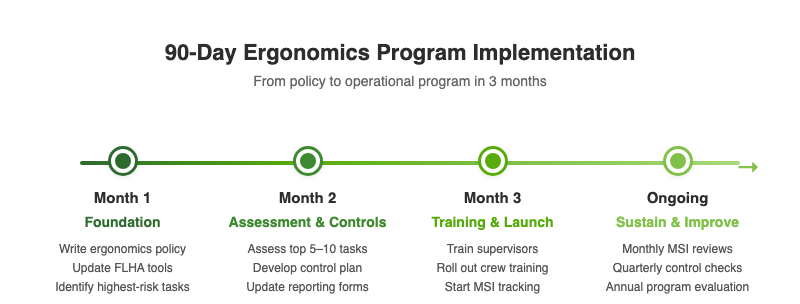
Here is a practical roadmap for how to create an ergonomics program that integrates into your existing safety management system. This is not a separate initiative. It is an enhancement to what you already have.
Month 1: Foundation
- Write your ergonomics policy. One page. Reference your existing OHS policy. Get management to sign it.
- Update your hazard assessment tools. Add ergonomic risk factors to your FLHAs, job hazard analyses, and site inspection checklists. Include: forceful exertion, awkward postures, repetitive motion, contact stress, vibration.
- Identify your highest-risk tasks. Walk the site. Talk to workers. Which tasks cause the most complaints? Which have the most manual handling? Start there.
Month 2: Assessment and Controls
- Assess the top 5 to 10 highest-risk tasks. Document the risk factors, frequency, duration, and current controls.
- Develop a control plan. For each high-risk task, identify at least one engineering or substitution control. Budget for it. Put a timeline on it.
- Update your incident reporting forms. Add fields for MSI-specific data: body part affected, task being performed, duration of exposure, available controls.
Month 3: Training and Launch
- Train supervisors first. They need to recognize ergonomic hazards, respond to worker complaints, and document findings.
- Roll out crew training. Task-specific, not generic. Show them the actual hazards in their actual work and the controls available.
- Start tracking. Begin collecting MSI reports, hazard observations, and control implementation data.
Ongoing: Sustain and Improve
- Monthly: review MSI reports and near-miss data at safety meetings
- Quarterly: check control implementation progress against your plan
- Annually: formal program evaluation with documented findings and action items
The mistake most contractors make is trying to build a perfect program from day one. You do not need a perfect program. You need a working program that improves over time. Start with the highest-risk tasks, put basic controls in place, train your people, and build from there. That is what building a safety program actually looks like.
Manage Your Ergonomics Program From One Dashboard
Don't let your ergonomics program become a collection of forgotten spreadsheets. Centralize your hazard reporting, corrective actions, and worker feedback in Safety Evolution.
30-Day Free Trial
Frequently Asked Questions
Is an ergonomics program required by law in Canada?
Requirements vary by province. In British Columbia, WorkSafeBC's OHS Regulation Part 4 (Sections 4.46 to 4.53) has specific Ergonomics (MSI) Requirements that mandate risk identification, assessment, control, training, evaluation, and worker consultation. In Alberta, the OHS Code requires employers to identify and control all workplace hazards, including ergonomic ones, and Part 14 specifically addresses lifting and handling loads. While neither province mandates a standalone "ergonomics program" by name, the regulatory requirements effectively require the components of one.
How does an ergonomics program help with COR certification?
An ergonomics program feeds directly into several COR audit elements, including hazard assessment, hazard control, training, incident investigation, and program administration. Having a structured approach to ergonomic hazards demonstrates maturity in your safety management system and can improve audit scores, particularly in hazard assessment and control elements where auditors evaluate how comprehensively you identify and address workplace risks.
What are the most common ergonomic hazards on construction sites?
The most common ergonomic hazards in construction include manual material handling (lifting, carrying, pushing heavy loads), repetitive tool use (hammering, drilling, fastening), awkward postures (overhead work, working in confined spaces, kneeling), whole-body vibration from heavy equipment operation, and sustained static postures. These risk factors are often combined on construction sites, which increases the overall MSI risk.
How long does it take to implement an ergonomics program?
A basic, functional ergonomics program can be operational in 60 to 90 days if you already have a safety management system in place. This covers policy development, updating hazard assessment tools, assessing high-risk tasks, implementing initial controls, and conducting training. Full program maturity, including established tracking systems, demonstrated continuous improvement, and comprehensive coverage of all tasks, typically takes 6 to 12 months.
What is the difference between an ergonomic assessment and an ergonomics program?
An ergonomic assessment is a one-time evaluation of specific tasks or workstations to identify MSI risk factors. An ergonomics program is the ongoing system that includes assessments as one component, along with management commitment, controls, training, incident reporting, and regular program evaluation. Think of the assessment as a snapshot; the program is the entire camera system running continuously.
Do small contractors need an ergonomics program?
Yes. MSI risk does not scale down with company size. A 10-person crew doing manual handling all day has the same ergonomic hazards as a 100-person crew. The scope of your program will be smaller, but the core components still apply: identify the hazards, assess the risks, put controls in place, train your people, and review what is working. For small contractors pursuing SECOR or a small contractor safety program, demonstrating ergonomic hazard management shows auditors that your safety program covers real workplace risks.
Get Weekly Safety Insights
Regulation updates, toolbox talk ideas, and compliance tips. One email per week.