Last updated: March 2026
Your drywall crew has been hanging sheets for three weeks straight. One guy's shoulder is shot. Another stopped mentioning the numbness in his hands two days ago. Nobody filed anything because "it's just sore muscles." Then a WCB claim hits and you find out that "just sore muscles" is a musculoskeletal disorder that's been building for months.
This is how ergonomic injuries work in construction. They don't announce themselves with a loud crack or a fall from height. They accumulate, quietly, one awkward lift and one overhead reach at a time, until your best people can't work.
We help contractors across Canada build safety programs that prevent exactly this kind of slow-burn injury, and construction ergonomics is one of the most overlooked pieces of those programs.
⚡ Quick Answer: Construction Ergonomics
- What: Matching construction tasks to workers' physical capabilities to prevent musculoskeletal disorders (MSDs)
- Why it matters: MSDs account for roughly 30% of all time-loss WCB claims in Canada. Construction is a top target sector for inspections in 2026.
- Key risks: Overhead work, heavy lifting, repetitive tool use, awkward postures in tight spaces, vibration
- What's required: Alberta OHS Code Part 14 and WorkSafeBC Regulation Part 4 both require employers to assess ergonomic hazards and implement controls
- Best starting point: SE-AI can analyse your incident data to identify your biggest ergonomic gaps
Construction ergonomics addresses the physical demands that make construction one of the highest-risk industries for musculoskeletal injuries in Canada. Lifting heavy materials, working in awkward positions, operating vibrating tools, and performing repetitive tasks all contribute to the sprains, strains, and chronic pain that cost the industry billions in WCB claims every year.
This guide covers the ergonomic hazards specific to construction work, practical controls that work on real job sites, and how to integrate ergonomics into your daily safety planning.
What Is Construction Ergonomics?
Construction ergonomics is the practice of designing work tasks, tool selection, and site layouts to fit the physical capabilities of construction workers, reducing the risk of musculoskeletal disorders (MSDs). Unlike office ergonomics, where you can set up a workstation once and leave it, construction ergonomics has to adapt to a work environment that changes every single day.
That's what makes it so difficult, and why most contractors skip it. Your crew isn't sitting at the same desk for eight hours. They're framing walls in the morning, carrying materials across uneven ground after lunch, and doing overhead electrical runs until quitting time. The "workstation" is whatever the job demands that day.
But skipping ergonomics doesn't make the injuries disappear. It just delays the WCB claim.
Why Do Ergonomic Injuries Hit Construction So Hard?
Most contractors think ergonomics is an office problem: desk chairs, monitor heights, keyboard trays. They're wrong. Construction workers face more ergonomic risk factors in a single shift than most office workers face in a month.
Between 2020 and 2024, WorkSafeBC accepted over 88,000 time-loss claims for musculoskeletal injuries, costing more than $2.35 billion. MSIs account for roughly 30% of all time-loss claims in BC and about 26% of total claim costs. In Ontario, the numbers are even higher: MSDs represent over 40% of all lost-time compensation claims.
Construction is specifically named as a target sector for WorkSafeBC's MSI inspection initiative in 2026. If your crews are in BC, expect inspectors to be asking about your ergonomic hazard assessments this year.
Here's the blunt truth: most construction MSD claims are preventable. Not with expensive equipment or an ergonomics consultant billing $200 an hour. With basic controls that cost next to nothing, applied consistently. The problem is that nobody applies them because nobody thinks "ergonomics" applies to their site.
What Are the Biggest Ergonomic Hazards on a Construction Site?
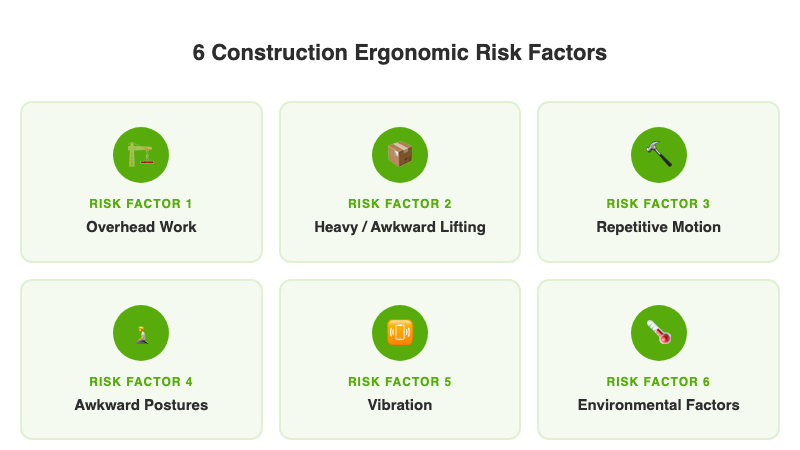
Construction piles multiple risk factors on top of each other in ways that other industries don't. Here are the six that drive the most injuries:
1. Overhead Work
Electrical, drywall, painting, mechanical. Anything above shoulder height compresses the rotator cuff tendons and strains the neck. A drywaller holding a 4x12 sheet overhead isn't just fighting gravity; they're grinding cartilage every time they adjust position. Do that for a full shift and the shoulder joint pays the price.
2. Heavy and Awkward Material Handling
Lumber, concrete forms, bundles of rebar, bags of cement. Construction materials are heavy, oddly shaped, and rarely come with handles. Workers grip, twist, and carry loads in positions no ergonomics textbook would recommend, because the job doesn't give them a better option.
3. Repetitive Motion
Hammering, drilling, screwing, raking concrete. A framer driving 500 nails a day with a hand hammer is a carpal tunnel claim waiting to happen. Power tools reduce some repetitive stress but introduce vibration, which creates its own set of problems.
4. Awkward Postures
Plumbing under a vanity. Wiring inside a wall cavity. Finishing concrete on your knees. Construction forces workers into positions that no human body was designed to hold for hours: kneeling, crouching, twisting, reaching into spaces that barely fit an arm.
5. Vibration Exposure
Hand-arm vibration from impact tools, grinders, and drills. Whole-body vibration from operating heavy equipment on rough terrain. Both contribute to nerve damage, circulation problems, and musculoskeletal wear that shows up months or years after the exposure.
6. Environmental Factors
Cold weather reduces grip strength and manual dexterity. Heat causes fatigue and reduces coordination. Wind adds instability when carrying large panels or sheets. And unlike a warehouse, you can't control the thermostat on a job site.
Construction MSDs Account for the Highest WCB Claim Costs
SE-AI checks your hazard assessments and incident data for ergonomic blind spots and flags the trades and tasks driving your MSD injury rates.
Get Early Access →
What Does Each Trade Risk?
Ergonomic risks are not the same across trades. A one-size-fits-all "lift with your legs" poster doesn't cut it. Here's what actually breaks down, by trade:
Framing: Shoulder injuries from overhead nailing, back strain from carrying heavy lumber and sheathing, wrist and forearm fatigue from repetitive hammering. Framers are often the youngest crew on site, which masks the damage until it catches up in their 30s and 40s.
Electrical: Shoulder and neck strain from extended overhead work in ceilings, wrist injuries from pulling wire and twisting connectors, hand-arm vibration from power tools in tight spaces.
Plumbing: Knee injuries from prolonged kneeling, back strain from working in crawl spaces and under fixtures, shoulder problems from reaching into wall cavities and working at floor level.
Concrete: Back injuries from raking, screeding, and finishing in a bent-over posture for hours. Whole-body vibration from concrete vibrators and power screeds. Hand-arm vibration from concrete grinders.
Drywall: Shoulder and back injuries from lifting and holding 4x8 or 4x12 sheets overhead. Repetitive strain in the wrist and arm from mudding and sanding. Neck strain from extended overhead finishing.
Steel and Ironwork: Heavy material handling injuries from beams and columns. Fatigue from working with loaded tool belts that add 10-20 lbs of asymmetric weight. Hand injuries from repetitive bolting and welding.
If your company runs multiple trades, each crew needs its own ergonomic hazard assessment. A safety program built for your framers will miss the risks your plumbers face. For more on building trade-specific safety protocols, see our guide on how to build a construction safety program.
What Do Canadian Regulations Require for Construction Ergonomics?
This isn't optional. Both Alberta and BC have specific regulatory requirements for ergonomic hazard prevention, and they apply directly to construction.
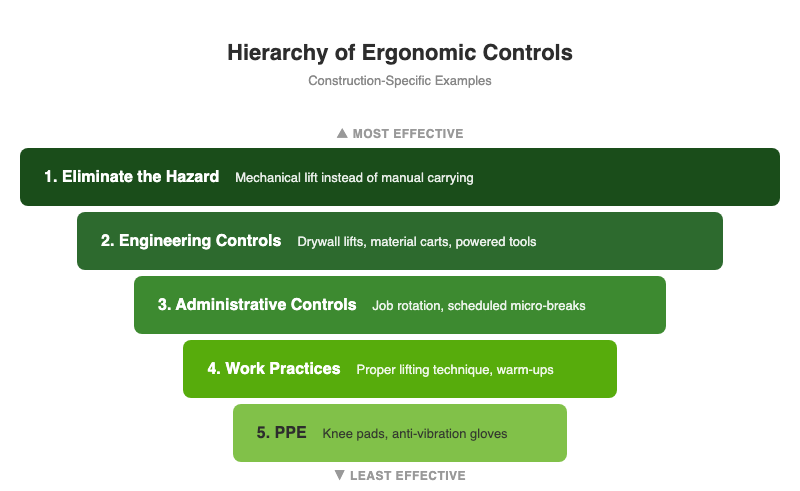
Alberta: OHS Code Part 14 (Lifting and Handling Loads)
Before a worker manually lifts, lowers, pushes, pulls, carries, handles, or transports a load that could injure them, the employer must perform a hazard assessment. That assessment must consider:
- The force required
- Repetition and duration of the task
- Work postures and positions
- Local contact stresses (pressure points on the body)
- Environmental conditions
The employer must then eliminate or control the hazard, provide appropriate equipment where reasonably practicable, and train workers on safe handling techniques.
BC: WorkSafeBC OHS Regulation Part 4 (Ergonomics / MSI Requirements)
Employers must identify and assess risk factors for musculoskeletal injury in the workplace. Section 4.49 lists the specific risk factors that must be assessed, including force, repetition, duration, posture, and vibration. Once identified, the employer must eliminate or minimize those risks.
WorkSafeBC has named MSI prevention as a key inspectional focus for 2026, specifically targeting sectors with elevated serious-injury and time-loss rates, including construction. If you're a BC contractor, this is the year to get your ergonomics documentation in order.
Both provinces require you to involve workers in the hazard identification process. Your crew knows which tasks destroy their bodies. Ask them. If you need help structuring a hazard identification process, our guide to job hazard analysis in construction walks through the steps.
What Controls Actually Work on a Construction Site?
Here's where most ergonomics advice falls apart. The "solutions" assume a fixed workplace: adjust the workstation height, buy a better chair, install anti-fatigue mats. That doesn't work when your "workplace" is a half-framed house in February.
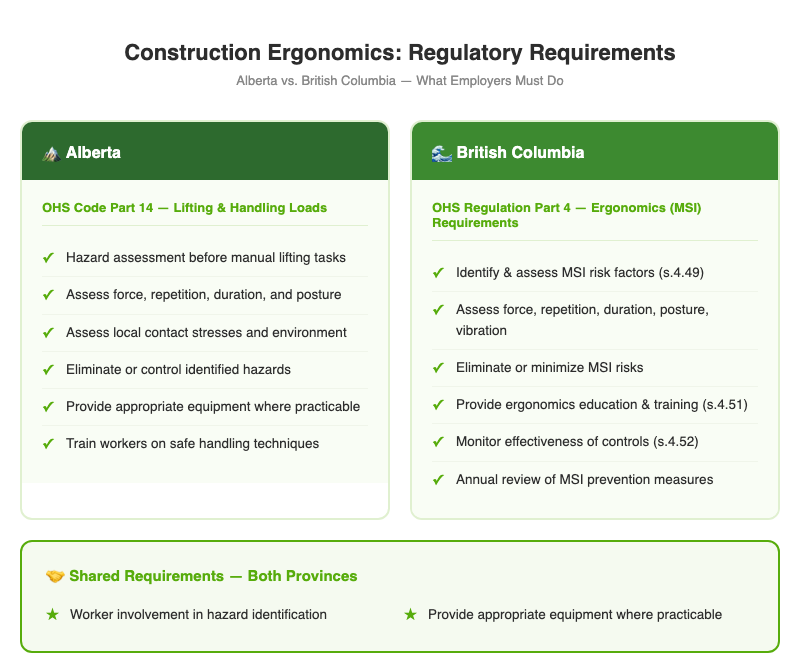
These controls work on real construction sites, and most of them cost nothing:
Job Rotation and Task Variety
Don't let the same worker do overhead work for an entire shift. Rotate tasks so that the muscle groups under stress get a break. A framer who alternates between overhead nailing and ground-level sheathing puts less cumulative strain on the shoulders than one who does eight hours of ceiling work.
Material Staging
Stage materials at waist height where possible. Don't stack drywall on the floor if workers need to lift it overhead. Use saw horses, carts, or pallets to keep loads between knee and shoulder height. This single change can cut the force required for a lift by 30-50%.
Right Tool for the Job
A pneumatic nailer eliminates hundreds of repetitive hammer strikes per day. A drywall lift turns a two-person overhead wrestling match into a one-person controlled operation. Anti-vibration gloves reduce hand-arm vibration transmission. These aren't luxury items; they're MSD prevention tools. Download our free construction toolbox talks for ready-made talks on tool safety and material handling.
Micro-Breaks
A 30-second stretch break every 30-45 minutes during repetitive tasks costs zero production time and significantly reduces cumulative strain. Build it into the work rhythm. The crew lead calls a quick stretch, everyone resets, and they go back to work. If your foreman thinks this is soft, ask them how productive a crew is when two guys are on WCB.
Warm-Up Stretches
A 5-minute dynamic warm-up before the shift starts prepares muscles for the physical demands ahead. Focus on shoulders, back, wrists, and knees. Pair this with your morning toolbox talk so it doesn't feel like extra time.
Site Layout Planning
Think about ergonomics during site setup, not after workers start complaining. Place materials close to where they'll be used. Keep walking paths clear so workers aren't twisting and reaching around obstacles. Position power sources so cords don't create trip or twist hazards.
Knee Pads and Support Equipment
Kneeling on concrete without knee pads is a guaranteed path to bursitis. Provide quality knee pads for any trade that works at floor level. Same logic applies to padded tool belts, ergonomic grips, and supportive footwear: small investments that prevent expensive claims.
Are Ergonomic Risk Factors in Your Field-Level Hazard Assessments?
SE-AI analyses your FLHAs, incident reports, and WCB claims for ergonomic gaps. It flags jobs where overhead work, heavy lifting, and repetitive motion are not being assessed, and identifies MSD patterns in your incident data before they become lost-time claims.
Get Early Access to SE-AI →
How Do You Build Ergonomics into Your Safety Program?
If your current safety program doesn't mention ergonomics, you have a gap. And if you're COR certified or working toward it, that gap will show up in your next audit. Ergonomics is a required element in most safety management systems.
Here's how to add it without reinventing your entire program:
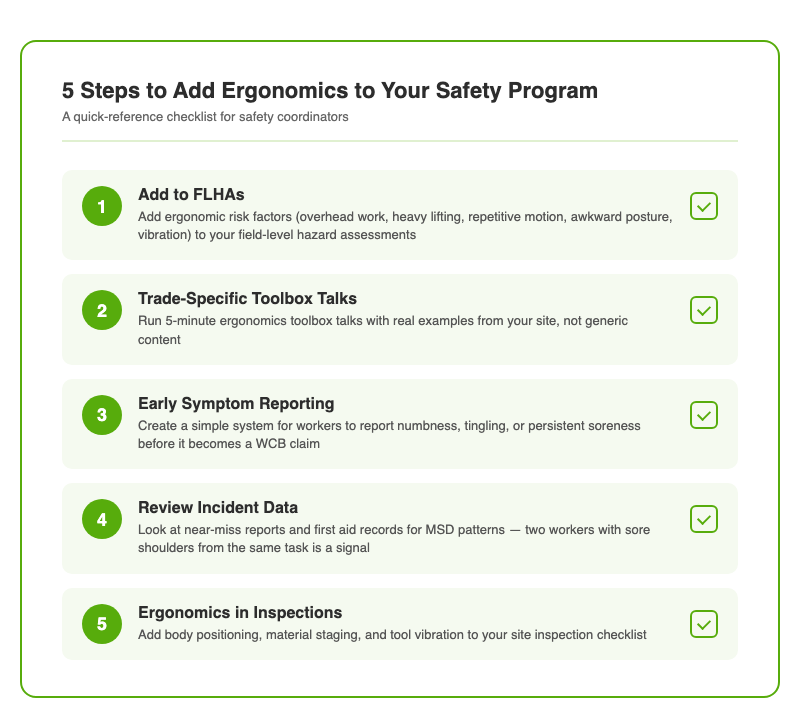
1. Add ergonomic risk factors to your FLHAs. Your field-level hazard assessments already identify hazards before each task. Add a line for ergonomic risks: overhead work, heavy lifting, repetitive motion, awkward posture, vibration. If the crew identifies one, they write down the control they're using. That's it. No new forms, no new process.
2. Run trade-specific ergonomics toolbox talks. A 5-minute toolbox talk on "how to stage drywall to save your shoulders" is more useful than a 30-minute lecture on MSD theory. Use real examples from your site. Safety Evolution builds toolbox talk programs that include ergonomic topics specific to your trades.
3. Track early symptoms, not just claims. By the time a worker files a WCB claim for a musculoskeletal disorder, the injury has been building for weeks or months. Create a simple early-reporting system: numbness, tingling, persistent soreness, reduced grip strength. When a worker reports symptoms early, you can modify the task before it becomes a lost-time claim.
4. Review your incident data. If you're already tracking safety practices on your sites, look at your near-miss reports and first aid records for MSD patterns. Two workers reporting sore shoulders after the same overhead task is a signal. Don't wait for the WCB claim to confirm it.
5. Include ergonomics in your site inspections. When your supervisor walks a site, they should be looking at how workers are positioning their bodies, not just whether hard hats are on. Are workers bending at the waist instead of squatting? Is material staged at floor level when it should be at waist height? Are power tools creating visible vibration stress?
The Cost of Doing Nothing
A single MSD claim from a construction worker typically means 4-8 weeks of lost time. That's the direct cost. Then add the replacement worker, the project delay, the WCB premium increase, and the paperwork. For a 20-person sub-trade, one serious back injury can cost $50,000-$100,000 in direct and indirect costs over the claim's lifecycle.
Now multiply that by the fact that MSDs account for 30-40% of all construction-related lost-time claims. If you're running three or four crews, the math says you'll have an MSD claim this year unless you're actively preventing them.
Compare that to the cost of prevention: knee pads ($30-$80 per worker), a drywall lift ($500-$2,000), anti-vibration gloves ($25-$50 per pair), and five minutes of toolbox talks. The ROI isn't even close.
Frequently Asked Questions
What are the most common ergonomic hazards in construction?
The most common ergonomic hazards in construction are overhead work (shoulder and neck strain), heavy and awkward material handling (back injuries), repetitive motion from tools (wrist and hand injuries), prolonged awkward postures like kneeling and crouching, and vibration exposure from power tools and heavy equipment. These risks stack on top of each other throughout a shift, making construction workers especially vulnerable to musculoskeletal disorders.
Are Canadian employers required to address ergonomics on construction sites?
Yes. In Alberta, OHS Code Part 14 requires employers to perform a hazard assessment before workers manually lift, lower, push, pull, or carry loads that could cause injury. In BC, WorkSafeBC OHS Regulation Part 4 requires employers to identify, assess, and eliminate or minimize musculoskeletal injury risk factors. Both provinces require worker involvement in the hazard identification process. WorkSafeBC has specifically named construction as a target sector for MSI inspections in 2026.
How much do musculoskeletal injuries cost construction contractors?
Direct and indirect costs for a single MSD claim in construction can range from $50,000 to $100,000 when you account for lost time (typically 4-8 weeks), replacement workers, project delays, WCB premium increases, and administrative costs. Across BC alone, MSI claims cost over $2.35 billion between 2020 and 2024. For a mid-size contractor, even one serious claim per year significantly impacts profitability and WCB premiums.
What is the cheapest way to reduce ergonomic injuries on a construction site?
The most cost-effective ergonomic controls are job rotation (alternating tasks so the same muscle groups aren't under constant strain), material staging at waist height instead of floor level, 30-second micro-breaks during repetitive tasks, and adding ergonomic risk factors to your existing field-level hazard assessments. None of these require new equipment or significant cost. For tool-based improvements, pneumatic nailers, drywall lifts, and anti-vibration gloves offer strong return on investment.
How do I add ergonomics to my existing safety program?
Start by adding ergonomic risk factors (overhead work, heavy lifting, repetitive motion, awkward postures, vibration) to your field-level hazard assessments. Run trade-specific ergonomics toolbox talks using real examples from your sites. Create an early symptom reporting system so workers flag numbness, tingling, or persistent soreness before it becomes a WCB claim. Review your incident and first aid data for MSD patterns. Include body positioning in your site inspections. If you need help identifying where to start, SE-AI can analyse your safety records and show you exactly where ergonomic gaps exist.
Does ergonomics come up in a COR audit?
Yes. COR audits evaluate whether your safety management system identifies and controls workplace hazards, which includes ergonomic hazards. Auditors will look for evidence that you've assessed MSD risk factors in your hazard assessments, provided training on safe work practices (including material handling), and implemented controls. If ergonomics is absent from your safety program documentation, it's a gap that will cost you points. Adding ergonomic risk factors to your FLHAs and running ergonomics toolbox talks are the fastest ways to close that gap.
Get Weekly Safety Insights
Regulation updates, toolbox talk ideas, and compliance tips. One email per week.