SECOR
How to Pass a COR Audit in Canada
COR audits require 80% to pass. Here's what auditors evaluate, where contractors fail, and how to prepare in Alberta and BC.
Your toolbox meeting form is audit evidence, not just a sign-in sheet. See what to include, how to fill it out, and common mistakes that cost COR points.
Last updated: March 2026
Your supervisor runs a toolbox talk every Monday morning. The crew stands in a circle, nods along for five minutes, and then someone passes around a clipboard. Half the guys scribble something illegible. The form goes into a binder that no one opens again until an auditor shows up and starts asking questions.
That binder is either going to save you or bury you. Safety Evolution helps contractors build audit-ready safety programs every week, and the toolbox meeting form is one of the most common places we see companies lose points they should never have lost.
A toolbox meeting form is a standardized document used to record the details of a toolbox talk or safety meeting, including the topic covered, who attended, what was discussed, and what follow-up actions were identified. It goes by several names: toolbox talk form, tailgate meeting form, safety meeting record, crew talk form. The name changes depending on who you work for, but the purpose is the same.
Think of it as the receipt for your safety meeting. Without it, the meeting never happened. Not in the eyes of your auditor, not in the eyes of a GC reviewing your submittal package, and not in the eyes of a regulator investigating an incident on your site.
Not sure if your toolbox meetings meet compliance standards? Book a free safety assessment — we'll review your safety meeting records and give you a 90-day action plan.
The Canadian Centre for Occupational Health and Safety (CCOHS) recommends that employers keep records of safety talks to demonstrate due diligence. Those records should include the topic, contents presented, worker feedback, and attendance. That is the bare minimum. A good toolbox meeting form captures significantly more.
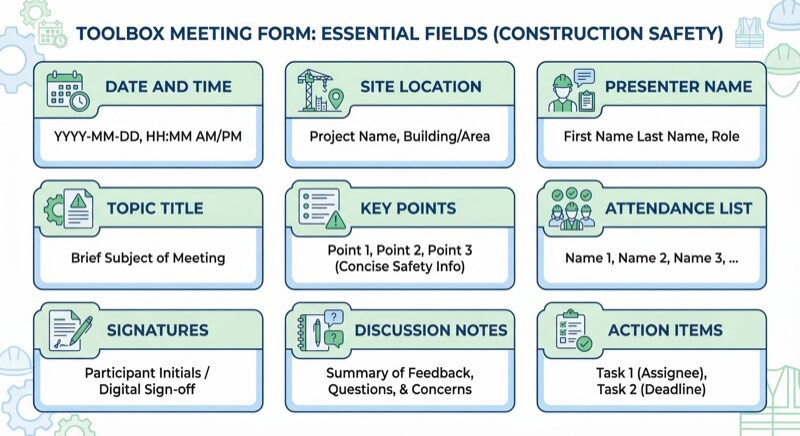
Most contractors think a toolbox talk form is just a sign-in sheet. They're wrong. A sign-in sheet proves people showed up. A proper toolbox meeting form proves what your crew learned, what concerns they raised, and what you did about it.
Here are the fields that belong on every toolbox meeting form:
If you need ready-made toolbox talk content to fill those forms with, Safety Evolution offers a free 365-topic toolbox talk package that gives you a full year of weekly content, organized by hazard type.
Having the right fields on your form is step one. Filling them out in a way that actually holds up under scrutiny is step two, and it is where most contractors fall apart.
Here is how a toolbox meeting form gets filled out in a way that protects your company:
Pick your topic based on current site conditions, recent incidents or near misses, seasonal hazards, or your scheduled toolbox talk rotation. Write down 3-4 key points you plan to cover. Fill in the header (date, site, your name) before the crew arrives. Walking up to a blank clipboard in front of your crew signals that you did not prepare, and they will check out before you start talking.
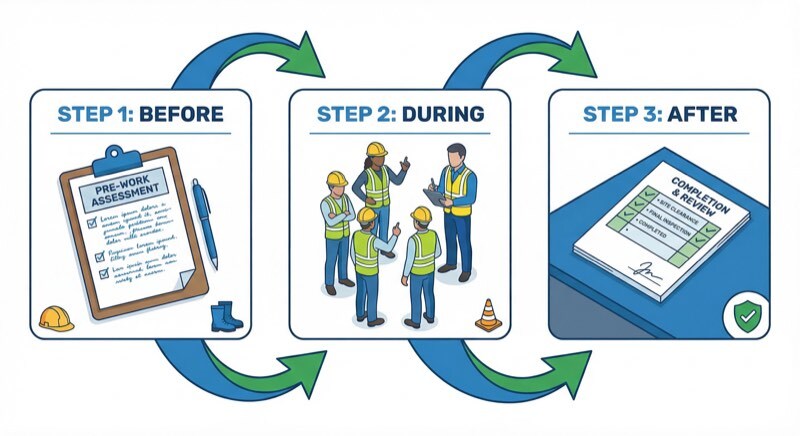
Deliver your talk. Then ask your crew a direct question: "What hazards are you seeing on site right now that relate to this topic?" Write down what they say. Not a summary. Not "crew had no concerns." Write the actual concern, even if it sounds minor. A 12-person electrical crew in Calgary once had a supervisor who wrote "no issues" in the discussion section for six straight months. When an auditor interviewed the crew, three of them recalled raising concerns about overhead work near live lines. That discrepancy cost the company points on their COR audit.
Pass the form around for signatures. Every person signs. If someone arrived late and missed the talk, they do not sign the form. Signing a form for a meeting you did not attend is falsifying a safety record, and it is the kind of detail that can unravel your entire program during an investigation.
Review the action items. Assign each one to a specific person with a deadline. "Look into it" is not an action item. "John to inspect scaffolding guardrails on Level 3 by end of shift Wednesday" is an action item. At your next toolbox talk, the first thing on your agenda should be reviewing whether last week's items were completed. That follow-up loop is what separates a real safety program from paperwork theater.
Not sure if your safety documentation would hold up under a COR audit? Book a free safety assessment with Safety Evolution. You will get a 30-minute call and a 90-day action plan to close the gaps.
We review safety documentation for contractors every week. These are the mistakes we see over and over again:
The form says "Slip, Trip, and Fall Prevention" at the top. Twelve names are signed below. There are no discussion notes, no key points documented, no action items. This form proves that 12 people gathered in a circle and heard a phrase. It does not prove that any safety information was communicated, understood, or acted on.
When every site has the same topic on the same day with the same discussion notes (or no discussion notes), it raises red flags. Auditors know what copy-paste looks like. Your toolbox talks should reflect the conditions on each specific site.
If the auditor cannot read the names, the attendance record is incomplete. If someone printed their name but did not sign, the record is incomplete. These small details matter during a COR audit or an incident investigation.
Action items from a toolbox talk that never get followed up are worse than no action items at all. They create a documented record that your company identified a problem and then did nothing about it. An auditor or a regulator will notice.
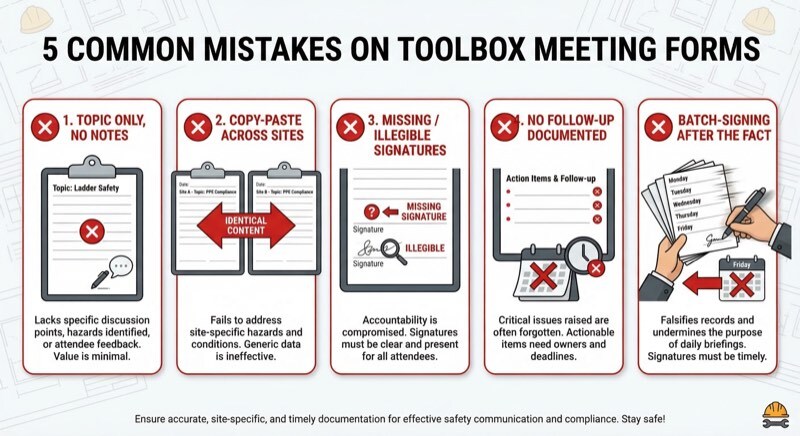
Here is the blunt truth: if your crew is signing toolbox talk forms at the end of the week for meetings that happened on Monday, your records are unreliable. Auditors check dates and patterns. Five forms all signed in the same pen colour on a Friday afternoon tell a very clear story, and it is not the one you want to tell.
If your company holds or is pursuing a Certificate of Recognition (COR). Proper documentation is how you demonstrate due diligence, your toolbox meeting forms are not optional documentation. They are auditable evidence.
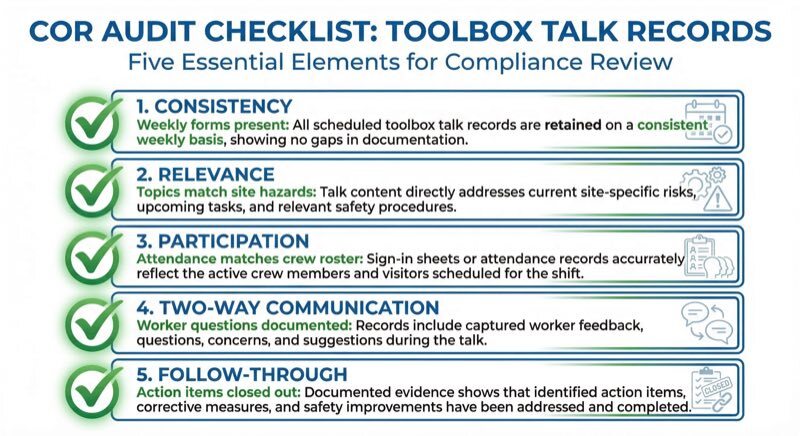
COR audits in Canada evaluate your health and safety management system across multiple elements. Toolbox talk records typically fall under the communication and training elements of the audit. Auditors review your documentation, interview your workers, and conduct site observations to verify that what is on paper matches what is happening on the ground.
Here is what auditors are looking for in your toolbox meeting records:
In Alberta, the ACSA COR audit tool specifically evaluates safety communication and worker participation. In BC, the BCCSA includes toolbox talks as part of their safety program assessment. Across provinces, the principle is the same: your toolbox talk forms are evidence that your safety management system is active, not just written on a shelf.
If your toolbox talk documentation has gaps or your forms are not capturing what auditors need to see, Safety Evolution can help. We build audit-ready safety programs built around structured toolbox talk schedules for contractors and handle everything from document control to daily form verification. Book a free safety assessment and we will show you exactly where your documentation stands.
Paper toolbox talk forms still work. Plenty of contractors run successful safety programs with clipboards and binders. But paper comes with real limitations that digital forms solve:
Digital toolbox talk forms through safety management software let you complete the form on a phone or tablet, capture signatures on-screen, attach photos, and store everything in the cloud where it is searchable and sortable. When audit time comes, you pull up the records in seconds instead of hours.
Safety Evolution's digital safety forms include toolbox talk templates that are built for COR audit requirements. Every form is stored, searchable, and linked to your safety program documentation.
You do not need to reinvent anything. Start with these principles:
If you want pre-built toolbox talk content to pair with your form, check out our free construction toolbox talk topics with over 50 ready-to-use talks.
You can also explore our full safety meeting roadmap for a complete framework on running effective safety meetings beyond just toolbox talks.
Want Expert Eyes on Your Safety Program?
Book a free 30-minute assessment with a safety consultant. You’ll get a 90-day action plan — whether you work with us or not.
Get Your Free Assessment →A complete toolbox meeting form should include: date and time, project name or site location, presenter name, topic title and key points discussed, attendee names and signatures, worker questions or concerns raised during the meeting, action items with assigned responsible persons and deadlines, and follow-up notes from the previous meeting. The discussion and action item sections are the most important for COR audit documentation.
Toolbox meetings should be documented every time they occur. The Canadian Centre for Occupational Health and Safety (CCOHS) recommends holding safety talks daily or weekly. In construction, weekly 15-minute sessions are the most common practice. Whatever frequency your safety program specifies, you need a completed form for every session. If your program says weekly and an auditor finds gaps, those missing forms become audit findings.
Toolbox talk forms supplement training records but do not replace formal training documentation. They demonstrate ongoing safety communication and awareness, which is a component of your health and safety management system. COR auditors review toolbox talk forms as evidence of regular safety communication, separate from your formal training matrix and competency records.
Yes. Digital toolbox talk forms are accepted by COR auditors across Canadian provinces. Digital forms offer advantages including timestamped signatures, automatic cloud storage, searchable records, and the ability to attach photos. The key requirement is that the form captures the same essential information: date, topic, attendance, discussion notes, and action items. Many contractors are switching to digital forms to reduce paperwork and improve audit readiness.
Missing toolbox talk documentation can result in lost points on your COR audit, specifically in the communication and training elements. If your safety program states that toolbox talks occur weekly, the auditor will look for 52 weeks of completed forms. Gaps in documentation suggest your safety program is not being implemented as written, which can affect your overall audit score and, in turn, your COR certification status and WCB premium discounts.
A toolbox meeting form is a small piece of paper that carries a lot of weight. It is evidence that your crew received safety information, that they had the chance to raise concerns, and that you followed through on the issues they identified. Get it right, and it protects your company during audits, investigations, and GC reviews. Get it wrong, and it becomes a liability.
Safety Evolution builds audit-ready safety programs for contractors across Canada. We handle everything: document control, daily form verification, toolbox talk content, and COR audit preparation. If you want to know where your safety documentation stands right now, book your free safety assessment. You will get a 30-minute call with our team and a 90-day action plan, free of charge.
COR audits require 80% to pass. Here's what auditors evaluate, where contractors fail, and how to prepare in Alberta and BC.
COR in Manitoba earns a 15% WCB rebate. Get the CSAM steps, 4 required courses, audit scoring thresholds, and realistic timelines to certification.
Trying to get SECOR certified? See eligibility, benefits, and the steps to become certified. Book a Free Safety Assessment to find out what to fix...