Safety Orientation Topics
15 safety orientation topics every employer must cover, with regulatory backing for Canada and the US. Built for construction and industrial...
Free safety orientation template with PPT, checklist, quiz, and answer key. Built for construction and industrial contractors in Canada and the US.
Last updated: April 2026
You need a safety orientation program. You do not need to build one from scratch. A safety orientation template is a pre-built framework that gives you the structure, topics, and documentation formats for a complete new worker safety orientation. Most contractors waste hours building PowerPoints, checklists, and quizzes that already exist in proven formats. The smart move is to start with a template and customize it for your site. Here is how to build a safety orientation program using a template, what the template should include, and where to get one for free.
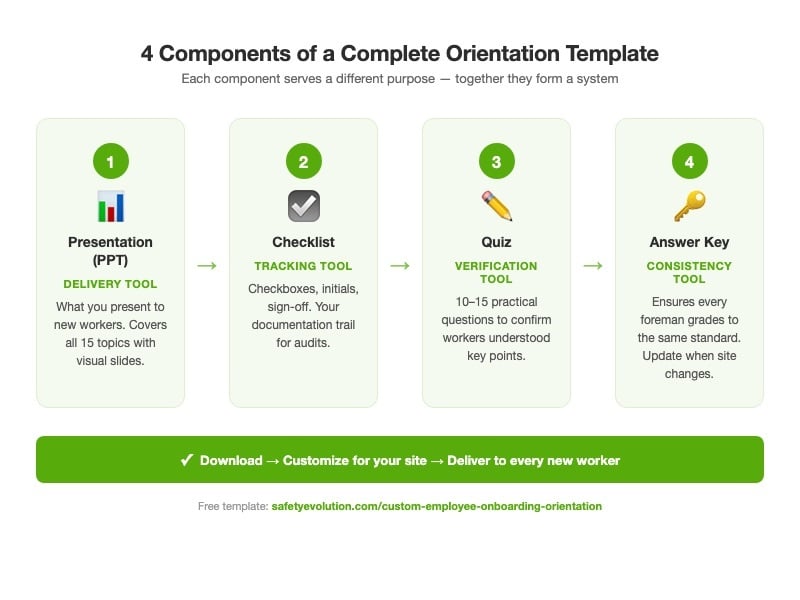
A complete safety orientation template is not just a PowerPoint. It is a system with four components that work together. Each serves a different purpose in the orientation process.
The core delivery tool. This is what your foreman or safety coordinator presents to new workers. It should cover every safety orientation topic: worker rights, site-specific hazards, emergency procedures, PPE, WHMIS/HazCom, incident reporting, first aid, and company policies. Keep slides visual. Large text, clear images, minimal bullet points. Nobody reads a wall of text on a projector screen.
The tracking tool. Each topic has a checkbox, an initials field, and space for notes. The facilitator checks off each item as it is covered. The worker initials each section. Both sign at the bottom. This is your documentation trail. See our full safety orientation checklist for the complete list of items.
The verification tool. Short questions (10 to 15) that test whether the worker understood the key points. Not trick questions. Practical questions: "Where is the nearest muster point?" "What PPE is required in the welding shop?" "Who do you report a near miss to?" A worker who cannot answer these questions was not effectively oriented, regardless of what the signed checklist says.
The consistency tool. When three different foremen grade quizzes, an answer key ensures they all apply the same standard. It also ensures the quiz stays accurate when site conditions change: update the answer key when you update the quiz.
Get the Complete Orientation Template Package
Quit building from scratch. SE's free Construction Safety Orientation Package includes a PowerPoint template, checklist, quiz, and answer key, all built for construction and industrial contractors. Download, customize, deliver.
Download the Free Package →A template gives you the structure. You supply the specifics. Here is the customization process.
Step 1: Identify your site-specific hazards. Pull your last 12 months of incident reports, near misses, and inspection findings. Add any hazards specific to the current phase of work. A template lists "site-specific hazards" as a topic. You fill in the actual hazards: overhead crane in Bay 3, open trench along the north perimeter, H2S potential in the process area.
Step 2: Update the regulatory section. Confirm which jurisdiction applies. An Alberta site references OHS Act s.3 and the OHS Code. A BC site references OHSR s.3.22 through 3.25. A US site references 29 CFR 1926.21 and applicable hazard-specific standards. The template provides the structure; you provide the regulation numbers.
Step 3: Update emergency information. Muster points, evacuation routes, emergency contacts, radio channels, nearest hospital. This changes with every site and sometimes with every phase of a project.
Step 4: Customize the PPE section. Minimum site PPE, task-specific PPE, where to get replacements. If your site requires H2S monitors, that is in the template. If it does not, remove it.
Step 5: Update the quiz. Every question must match the current site conditions. If you moved the muster point last month, the quiz question about the muster point must reflect that. Update the answer key to match.
Step 6: Test it. Run the orientation once with an experienced worker and ask them to poke holes. They will find gaps a new worker would never notice but would definitely be affected by.
Paper templates work. Digital templates work better. Here is why.
Paper: Familiar, requires no technology, works in remote locations with no connectivity. Downsides: lost forms, illegible handwriting, no searchability, difficult to audit across multiple sites.
Digital: Searchable, auditable, accessible from any device, impossible to lose. Workers complete orientation on a tablet or phone. Records are automatically stored, timestamped, and searchable. When the inspector asks for Worker #247's orientation record, you pull it up in seconds instead of digging through filing cabinets.
Both satisfy regulatory requirements. Digital reduces administrative burden, especially for contractors managing orientations across multiple sites with rotating crews.
Standardize Your Safety Orientation
Make sure every new hire gets the same critical safety information. Download our Free Construction Safety Orientation Package.
Download the Free Orientation Package →Safety Evolution offers a free Construction Safety Orientation Package that includes a PowerPoint template, orientation checklist, quiz, and answer key. Download it here. It is built for construction and industrial contractors and can be customized for any work site.
A complete template system includes a presentation (PowerPoint or Google Slides), a checklist (Word, PDF, or digital form), a quiz (Word or digital), and an answer key. The presentation delivers the content. The checklist tracks coverage. The quiz verifies comprehension. All four components should be editable so you can customize them for your specific site.
Use the same base template structure, but customize the site-specific sections for each location. The hazards, emergency procedures, PPE requirements, and emergency contacts will differ between sites. A template that is not customized for the actual work site does not meet the regulatory requirement for site-specific training.
Update the template whenever site conditions change: new hazards, new equipment, new regulations, or after a significant incident. At minimum, review it annually and at the start of every new project or construction phase. The quiz and answer key must be updated to match any content changes.
OSHA does not specify the format of training delivery. A PowerPoint-based orientation is acceptable if it covers the required topics and is documented. Documentation means signed attendance records, completed checklists, and quiz results, not just the PowerPoint file itself. The training must also include opportunity for questions and hands-on demonstrations where applicable.
Get Weekly Safety Insights
Regulation updates, toolbox talk ideas, and compliance tips. One email per week.
15 safety orientation topics every employer must cover, with regulatory backing for Canada and the US. Built for construction and industrial...
A complete safety orientation checklist for construction and industrial contractors. Covers all regulatory requirements for Canada and the US.
Safety orientation keeps new workers alive. Requirements for Canada and the US, what to include, and how to build a program that works.